

Today I’m going to show you how you can create an agent inside Microsoft Foundry using Microsoft Agent Framework, add MCP and use OpenTelemetry.
Prerequisites:
Azure Resource Group
Microsoft Foundry Resource & Project
Create model for the inference (I used gpt-4o)
Configure environment variables
Application Insights Resource
NuGet Packages:
Azure.AI.Projects.Agents (2.1.0-beta.2)
Azure.Identity (latest stable)
Microsoft.Agents.AI.Foundry (1.6.2-preview.260521.1)
Azure.AI.OpenAI (2.1.0)
using Azure.AI.Projects;
using Azure.AI.Projects.Agents;
using Azure.Identity;
using Microsoft.Agents.AI.Foundry;
using OpenAI.Responses;

var endpoint = Environment.GetEnvironmentVariable("AZURE_AI_PROJECT_ENDPOINT")
    ?? throw new InvalidOperationException("AZURE_AI_PROJECT_ENDPOINT is not set.");
var model = Environment.GetEnvironmentVariable("AZURE_AI_MODEL_DEPLOYMENT_NAME") ?? "gpt-4o";

const string AgentName = "MicrosoftLearnAgent";
const string AgentInstructions = "You answer questions by searching the Microsoft Learn content only through MCP. If you can't find an answer - just say so! Don't ever use your general knowledge!";

#pragma warning disable OPENAI001 // Type is for evaluation purposes only and is subject to change or removal in future updates. Suppress this diagnostic to proceed.
var mcpTool = ResponseTool.CreateMcpTool(
    serverLabel: "microsoft_learn",
    serverUri: new Uri("https://learn.microsoft.com/api/mcp"),
    toolCallApprovalPolicy: new McpToolCallApprovalPolicy(GlobalMcpToolCallApprovalPolicy.NeverRequireApproval));
#pragma warning restore OPENAI001 // Type is for evaluation purposes only and is subject to change or removal in future updates. Suppress this diagnostic to proceed.


var aiProjectClient = new AIProjectClient(new Uri(endpoint), new DefaultAzureCredential());

var connectionString = aiProjectClient.Telemetry.GetApplicationInsightsConnectionString();
Environment.SetEnvironmentVariable("APPLICATIONINSIGHTS_CONNECTION_STRING", connectionString);

var agentVersion = await aiProjectClient.AgentAdministrationClient.CreateAgentVersionAsync(
    AgentName,
    new ProjectsAgentVersionCreationOptions(
        new DeclarativeAgentDefinition(model)
        {
            Instructions = AgentInstructions,
            Tools = { mcpTool }
        }));

#pragma warning disable OPENAI001
FoundryAgent agent = aiProjectClient.AsAIAgent(agentVersion);
#pragma warning restore OPENAI001

Console.WriteLine(await agent.RunAsync("What are Local MCP Tools"));
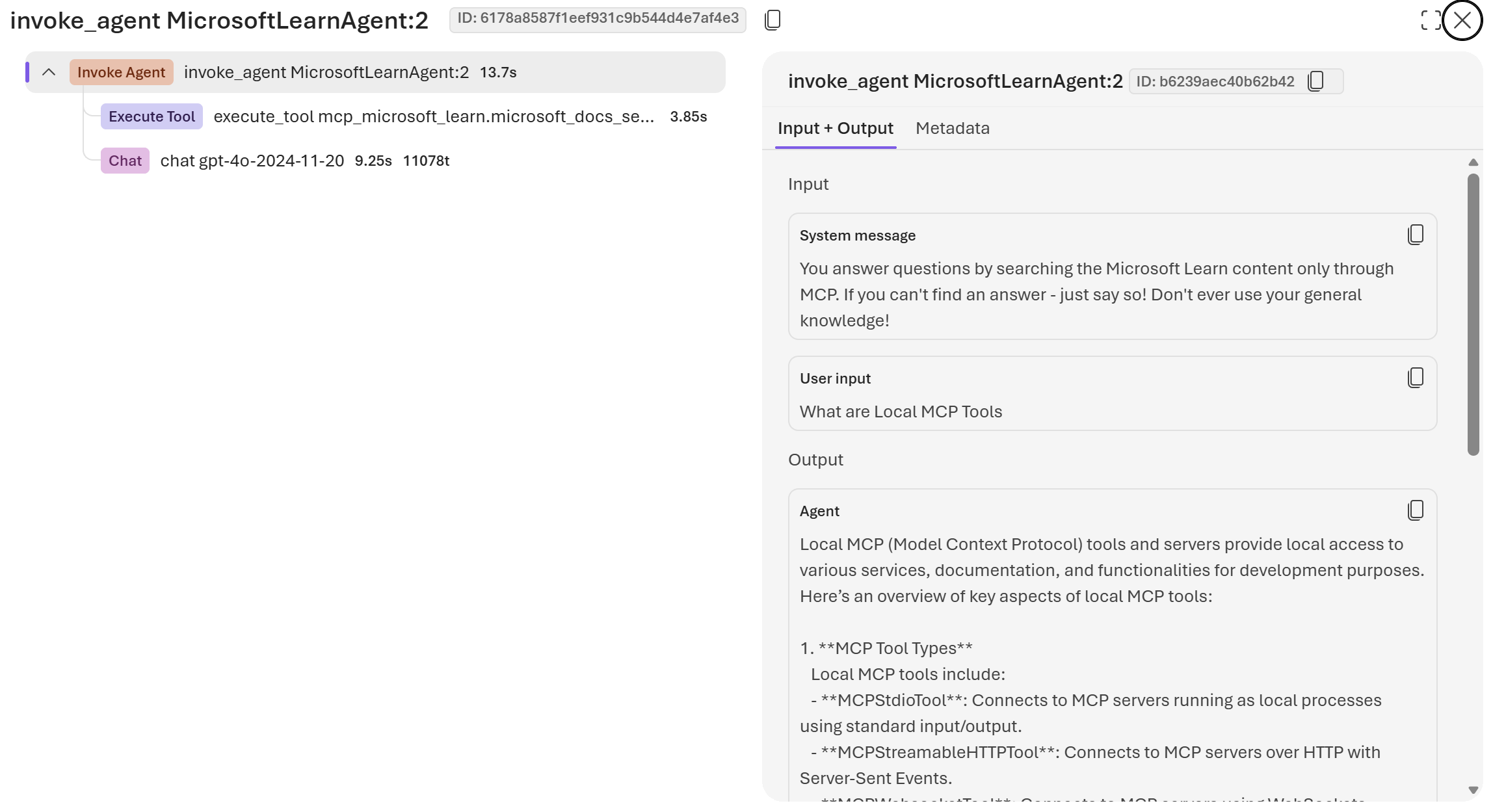
… and here’s the telemetry inside AppInsights. As you can see it is executing the mcp tool.
That’s it! Short and sweet!