

Today we’re going to see how to build workflows with FAN-OUT / FAN-IN architecture using Microsoft Agent Framework. We’re also going to add telemetry using Aspire.
If you prefer video - here’s a quick walkthrough:
Here’s the architecture:
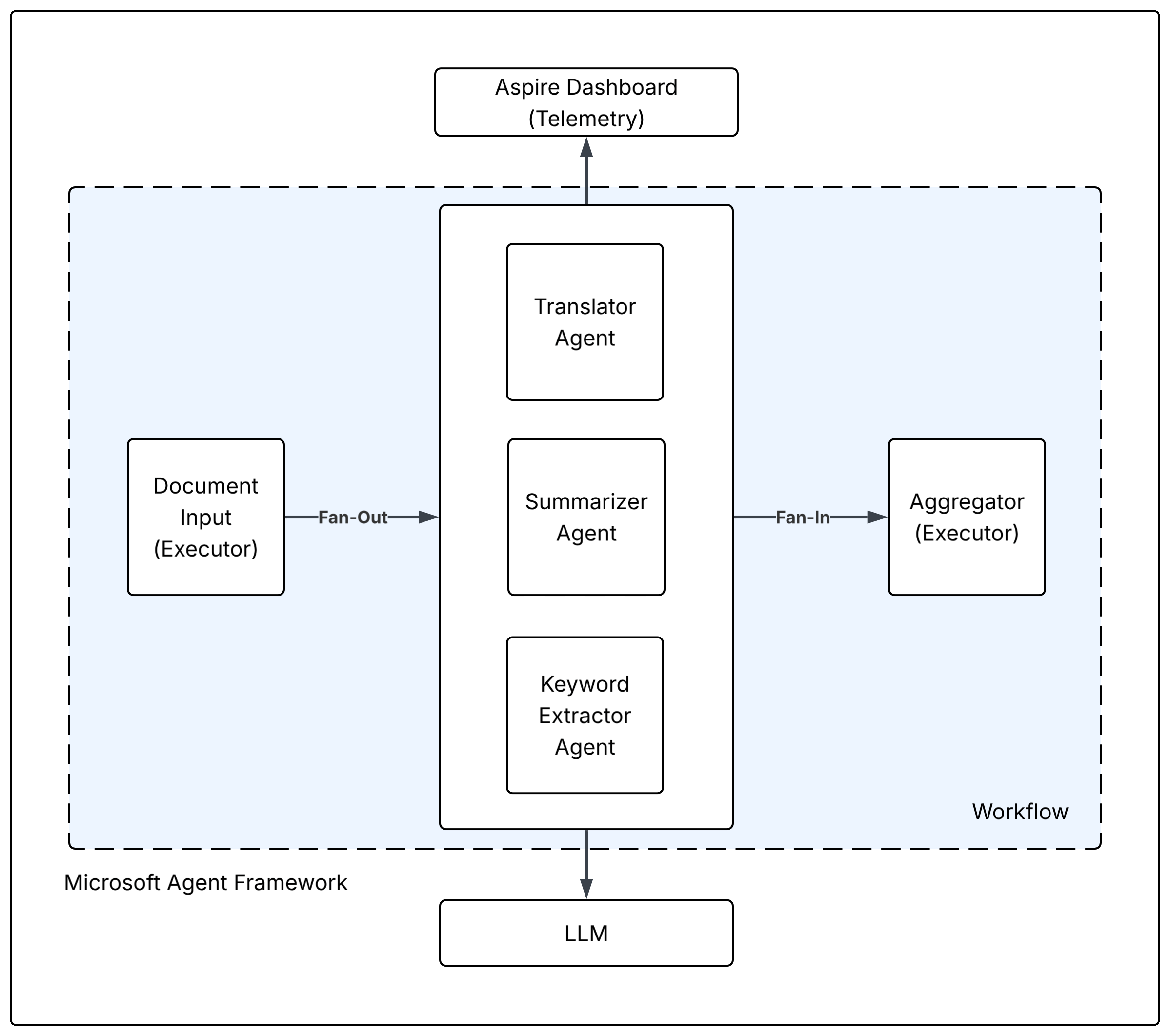
We have 2 executors - one that takes input, and one that aggregates the output, and 3 agents - one that translates text, one that summarizes it, and one that extracts keywords. We are using Microsoft Foundry for LLMs and Aspire Dashboard for local telemetry.
Here’s the code:
// Program.cs

using Azure.AI.Projects;
using Azure.Identity;
using Microsoft.Agents.AI;
using Microsoft.Agents.AI.Workflows;
using Microsoft.Extensions.AI;
using Microsoft.Extensions.Logging;
using OpenTelemetry;
using OpenTelemetry.Logs;
using OpenTelemetry.Resources;
using OpenTelemetry.Trace;
using System.Diagnostics;

/// <summary>
/// Demonstrates a fan-out workflow where a single text document is dispatched
/// in parallel to three specialist agents.
/// </summary>
public static class Program
{
    private const string SourceName = "Workflows.DocumentFanOut";
    private static readonly ActivitySource s_activitySource = new(SourceName);

    private static async Task Main()
    {
        var endpoint = Environment.GetEnvironmentVariable("AZURE_AI_PROJECT_ENDPOINT")
            ?? throw new InvalidOperationException("AZURE_AI_PROJECT_ENDPOINT is not set.");

        var deploymentName =
            Environment.GetEnvironmentVariable("AZURE_AI_MODEL_DEPLOYMENT_NAME")
            ?? "gpt-4o-mini";

        var resourceBuilder = ResourceBuilder
            .CreateDefault()
            .AddService(
                serviceName: "DocumentFanOut",
                serviceVersion: "1.0.0");

        using var tracerProvider = Sdk.CreateTracerProviderBuilder()
            .SetResourceBuilder(resourceBuilder)
            .AddSource(SourceName)
            .AddOtlpExporter()
            .Build();

        using var loggerFactory = LoggerFactory.Create(builder =>
        {
            builder
                .SetMinimumLevel(LogLevel.Trace)
                .AddConsole()
                .AddOpenTelemetry(logging =>
                {
                    logging.SetResourceBuilder(resourceBuilder);
                    logging.IncludeFormattedMessage = true;
                    logging.IncludeScopes = true;
                    logging.ParseStateValues = true;

                    logging.AddOtlpExporter();
                });
        });

        var logger = loggerFactory.CreateLogger(SourceName);

#pragma warning disable OPENAI001
        var chatClient = new AIProjectClient(new Uri(endpoint), new DefaultAzureCredential())
            .GetProjectOpenAIClient()
            .GetProjectResponsesClient()
            .AsIChatClient(deploymentName)
            .AsBuilder()
            .UseOpenTelemetry(
                sourceName: SourceName,
                configure: cfg => cfg.EnableSensitiveData = true)
            .Build();
#pragma warning restore OPENAI001

        using var activity = s_activitySource.StartActivity("main");

        logger.LogInformation(
            "Application started. TraceId: {TraceId}",
            activity?.TraceId);

        var translator = new ChatClientAgent(
            chatClient,
            name: "Translator",
            instructions: "You are a professional translator. Translate the user's document into Spanish. Output only the translated text, no commentary."
        ).BindAsExecutor(new AIAgentHostOptions { ForwardIncomingMessages = false });

        var summarizer = new ChatClientAgent(
            chatClient,
            name: "Summarizer",
            instructions: "You are a concise summarizer. Produce exactly 3 bullet points that capture the key ideas of the document."
        ).BindAsExecutor(new AIAgentHostOptions { ForwardIncomingMessages = false });

        var keywordExtractor = new ChatClientAgent(
            chatClient,
            name: "KeywordExtractor",
            instructions: "You are a keyword-extraction specialist. Return the top 5 most important keywords from the document as a numbered list."
        ).BindAsExecutor(new AIAgentHostOptions { ForwardIncomingMessages = false });

        var documentInput = new DocumentInputExecutor();
        var aggregator = new ResultsAggregatorExecutor();

        var workflow = new WorkflowBuilder(documentInput)
            .AddFanOutEdge(documentInput, [translator, summarizer, keywordExtractor])
            .AddFanInBarrierEdge([translator, summarizer, keywordExtractor], aggregator)
            .WithOutputFrom(aggregator)
            .WithOpenTelemetry(
                configure: cfg => cfg.EnableSensitiveData = true,
                activitySource: s_activitySource)
            .Build();

        const string document = """
            Photosynthesis is the process by which green plants, algae, and some bacteria
            convert light energy into chemical energy stored in glucose. Using sunlight,
            water absorbed from the soil, and carbon dioxide from the air, plants produce
            oxygen as a byproduct. This process occurs primarily in the chloroplasts, where
            the pigment chlorophyll captures light. Photosynthesis is fundamental to life
            on Earth, forming the base of nearly all food chains and maintaining atmospheric
            oxygen levels.
            """;

        Console.WriteLine("=== Input document ===");
        Console.WriteLine(document);
        Console.WriteLine(new string('=', 60));

        logger.LogInformation("Starting fan-out workflow");

        await using StreamingRun run =
            await InProcessExecution.RunStreamingAsync(workflow, input: document);

        await foreach (WorkflowEvent evt in run.WatchStreamAsync())
        {
            switch (evt)
            {
                case WorkflowOutputEvent output:
                    logger.LogInformation(
                        "Workflow completed. Results:{NewLine}{Output}",
                        Environment.NewLine,
                        output.Data);
                    break;

                case WorkflowErrorEvent error:
                    logger.LogError(error.Exception, "Workflow error");
                    break;

                case ExecutorFailedEvent failed:
                    logger.LogError(
                        "Executor '{ExecutorId}' failed: {Data}",
                        failed.ExecutorId,
                        failed.Data);
                    break;
            }
        }

        logger.LogInformation("Application finished");
    }
}
Executors are the fundamental building blocks that process messages in a workflow. They are autonomous processing units that receive typed messages, perform operations, and can produce output messages or events.
// Executors.cs

using System.Text;
using Microsoft.Agents.AI.Workflows;
using Microsoft.Extensions.AI;

/// <summary>
/// Receives the raw document string and broadcasts it as a <see cref=”ChatMessage”/>
/// followed by a <see cref=”TurnToken”/> to all downstream agents simultaneously.
/// </summary>
[SendsMessage(typeof(ChatMessage))]
[SendsMessage(typeof(TurnToken))]
internal sealed class DocumentInputExecutor() : Executor<string>(”DocumentInput”)
{
    public override async ValueTask HandleAsync(
        string document,
        IWorkflowContext context,
        CancellationToken cancellationToken = default)
    {
        // Broadcast the document to all fan-out targets.
        await context.SendMessageAsync(new ChatMessage(ChatRole.User, document), cancellationToken: cancellationToken);
        // TurnToken kicks off each receiving agent’s inference turn.
        await context.SendMessageAsync(new TurnToken(emitEvents: false), cancellationToken: cancellationToken);
    }
}

/// <summary>
/// Collects the <see cref=”ChatMessage”/> lists produced by each agent after the
/// fan-in barrier fires, then emits a single formatted string as the workflow output.
/// </summary>
[YieldsOutput(typeof(string))]
internal sealed class ResultsAggregatorExecutor() : Executor<List<ChatMessage>>(”ResultsAggregator”)
{
    private readonly List<ChatMessage> _buffer = [];

    /// <summary>
    /// Each call receives all messages produced by one agent during its turn.
    /// </summary>
    public override ValueTask HandleAsync(
        List<ChatMessage> messages,
        IWorkflowContext context,
        CancellationToken cancellationToken = default)
    {
        _buffer.AddRange(messages);
        return default;
    }

    /// <summary>
    /// Called once all agent replies for this super-step have been delivered.
    /// Formats and yields the combined output.
    /// </summary>
    protected override ValueTask OnMessageDeliveryFinishedAsync(
        IWorkflowContext context,
        CancellationToken cancellationToken = default)
    {
        var sb = new StringBuilder();

        foreach (var msg in _buffer)
        {
            sb.AppendLine($”--- {msg.AuthorName} ---”);
            sb.AppendLine(msg.Text);
            sb.AppendLine();
        }

        _buffer.Clear();

        return context.YieldOutputAsync(sb.ToString(), cancellationToken);
    }
}
Here’s the console output from Aspire:
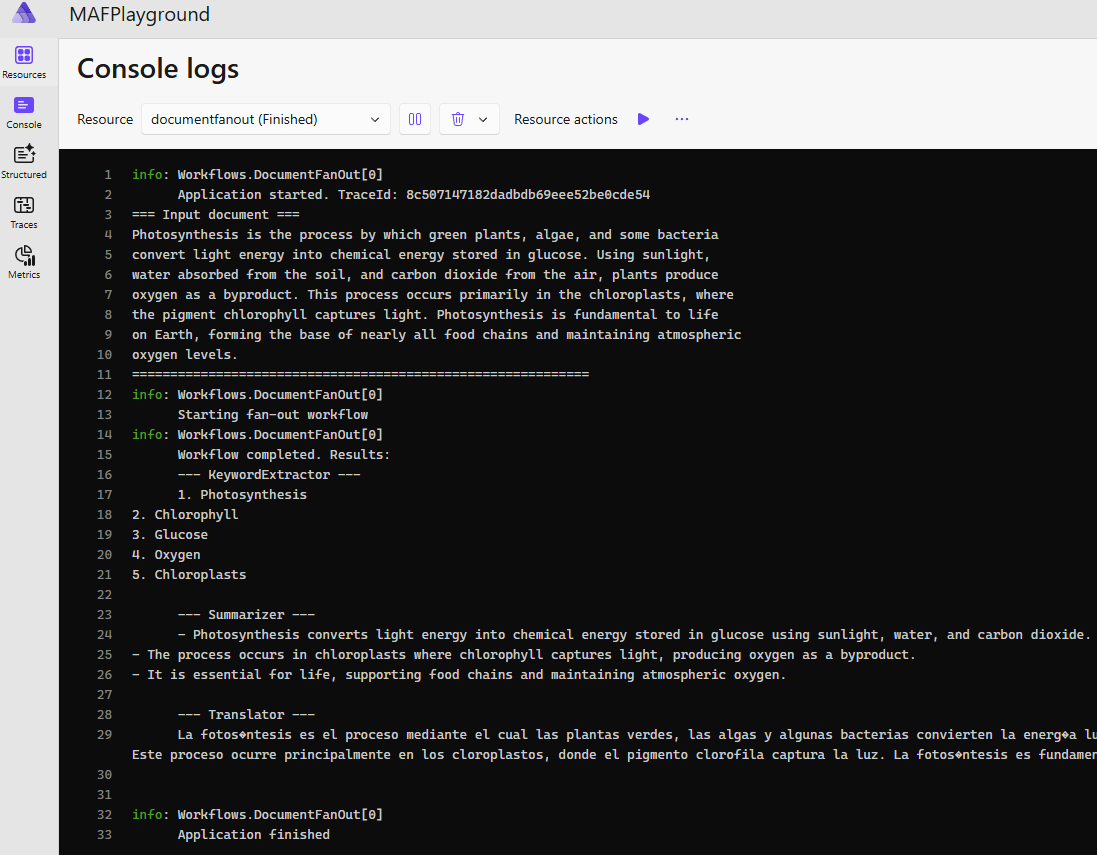
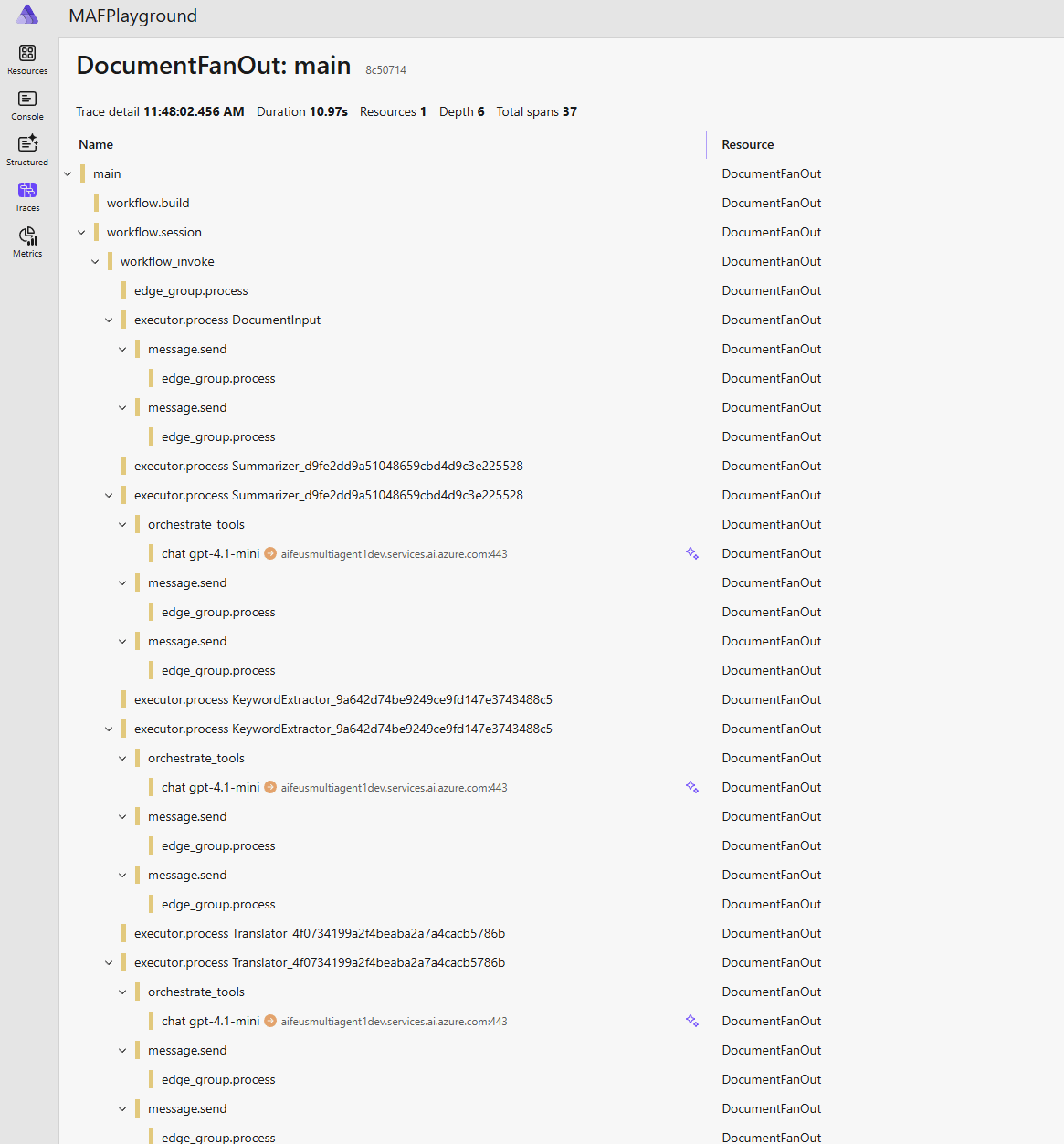
Here are the traces:
That’s it! For more - read the docs and start experimenting!