

Lately, I’ve been experimenting around with Aspire by building a simple e-commerce distributed application that consists of a few microservices: Payments, Orders, Notifications, Invoices, Catalog, Shipping, Cart, and a single Web UI.
Each one of the microservice has its own SQL database (except for Cart, which uses Redis), all of which containerized. The idea of my experiment was to see how easy it really makes the life of a developer that’s been assigned to work on a distributed system with lots of moving parts.
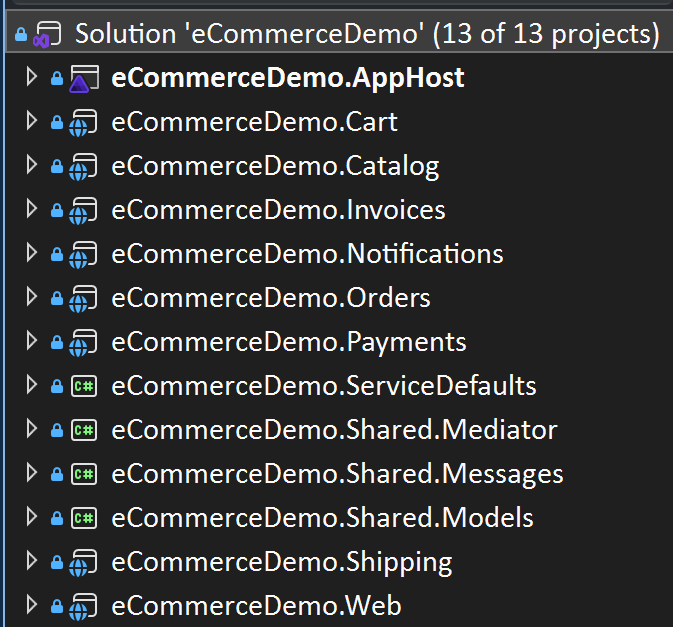
Here’s what the solution structure looks like.
And here’s the architecture diagram that represents the action flow.
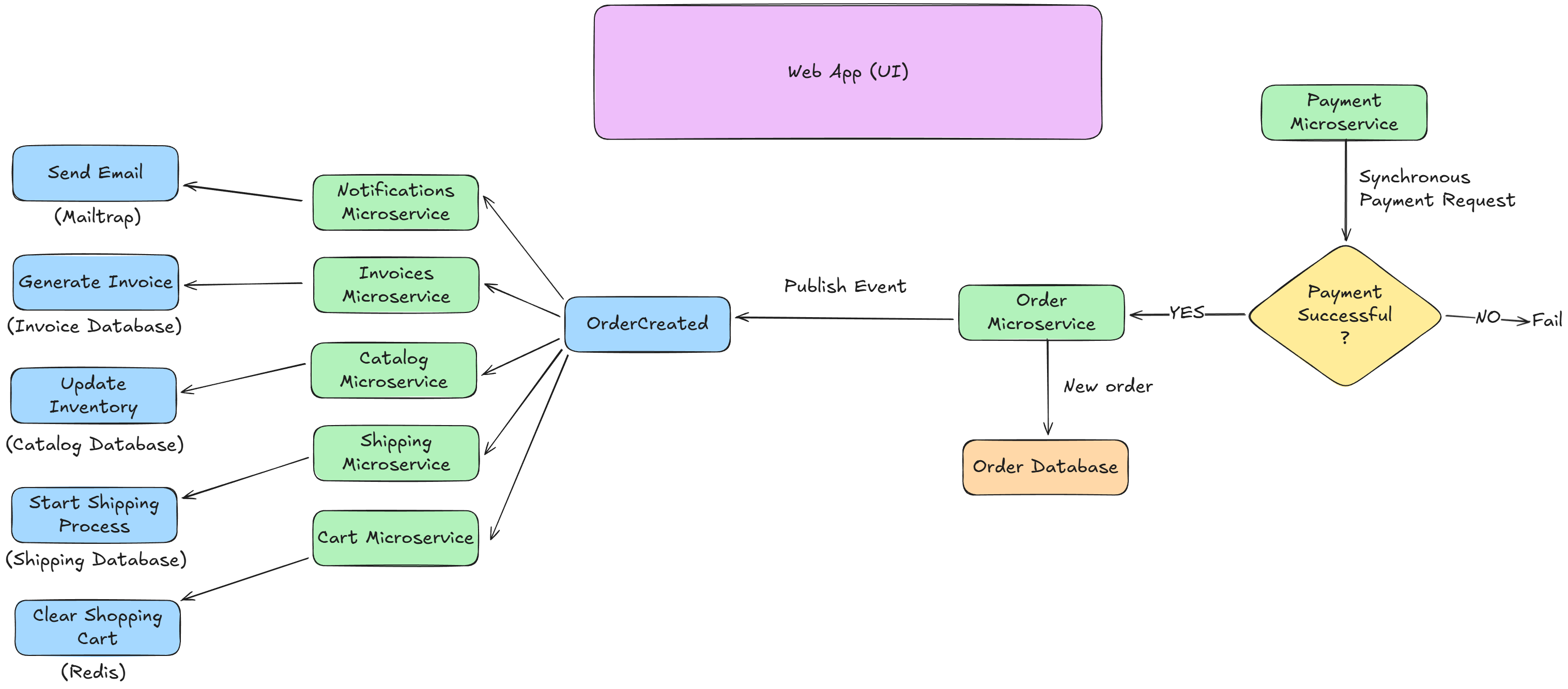
The flow starts with the user paying for the items they have in their shopping cart (Redis). Once the payment goes through, a call to Order microservice creates a new order with all the required information. Once the new order is created in the database the service pushes a new OrderCreated event to notify the whole system. Now, this is just a quick and dirty. In a real scenario we should consider something like The Saga Pattern to ensure that we don’t leave our system in a corrupt state (e.g., the insert in the order database failed, but we pushed an event for the new order)
To implement the event-based communication flow I used a library called NServiceBus. It is a paid solution, but available for free as long as your solution is not reaching a production environment (e.g., free for Dev, Test, QA, UAT).
Now, what exactly is Aspire?
Think of Aspire as a production-ready platform (from Microsoft) that allows you to build, test, deploy, debug, and run distributed applications. It provides built-in tooling for local development, containerization, orchestration, and observability, making it much easier to work with distributed systems.
Aspire really makes things so much easier. For example, see how easily I’ve added RabbitMQ as a messaging broker to my solution.
// RabbitMQ
var messaging = builder
    .AddRabbitMQ("messaging")
    .WithManagementPlugin(15672)
    .WithLifetime(ContainerLifetime.Persistent);
Here’s my SQL database.
// SQL Server
var sql = builder
    .AddSqlServer("sql")
    .WithLifetime(ContainerLifetime.Persistent);
And that’s my Redis cache.
// Redis
var cartcache = builder.AddRedis("cartcache")
    .WithLifetime(ContainerLifetime.Persistent);
And this is how I’m creating the Orders microservice, its own SQL database, and then injecting the RabbitMQ messaging that we declared above to be used in it for event-based communication.
// Catalog
var catalogDb = sql.AddDatabase("CatalogDb", "eCommerceDemo.Catalog");
var catalog = builder.AddProject<Projects.eCommerceDemo_Catalog>("catalog")
    .WithReference(catalogDb)
    .WaitFor(catalogDb)
    .WithReference(messaging)
    .WaitFor(messaging);
Tell me that isn’t easy!
If you’re curious about how this looks in action you should check my latest video where I give a detailed walkthrough. You’ll see how a single order creation triggers other services and we’ll even send an email.