

Recently I stumbled upon a fascinating repo from Andrej Karpathy: LLM Council.
It’s a lightweight local web app that looks like ChatGPT, but instead of relying on a single model, it lets multiple LLMs answer your question, critique each other, and then produce a final, consolidated result.
Here’s the core idea, quoting the repo:
Instead of asking a question to your favorite LLM provider (OpenAI GPT-5.1, Google Gemini, Anthropic Claude, xAI Grok, etc.), you can group them into your “LLM Council”.
Your query is sent to all of them through OpenRouter, they each give an answer, they review and rank each other’s work, and finally a Chairman LLM produces the final response.
And honestly — it’s brilliant.
Why This Is Cool
When you ask a single LLM a question, you’re trusting one model’s reasoning, training data, biases, and blind spots.
With LLM Council, a few things change:
Multiple models answer the same question independently.
They then evaluate each other’s responses.
The system picks a “Chairman LLM” (you choose which) to read all answers and critiques, and then write a final, improved response.
It’s like having a panel of experts debate the prompt before speaking to you.
Why This is Cool?
LLMs behave differently:
Some are great with code (Claude).
Some are great coders and overall thinkers (GPT-5.1).
Some are creative and fast (Gemini).
Some are cheap and fast (Mixtral, Qwen, etc.).
Instead of guessing which one is best for each prompt, LLM Council lets them collaborate.
As models become more specialized, this “debate → critique → consolidate” pattern becomes extremely powerful.
It’s basically a tiny research lab running on your laptop.
Trying It Out
The repo is simple to clone and run. Basically, you just follow the README and you’re done. You’ll need an OpenRouter API key — everything else works out of the box.
Demo
Running It on Windows
If you’re on Windows, there’s one extra step: the repo uses a start.sh shell script.
Windows doesn’t run .sh files natively, so you need a shell environment.
I used Git Bash (included with Git for Windows) to run the script:
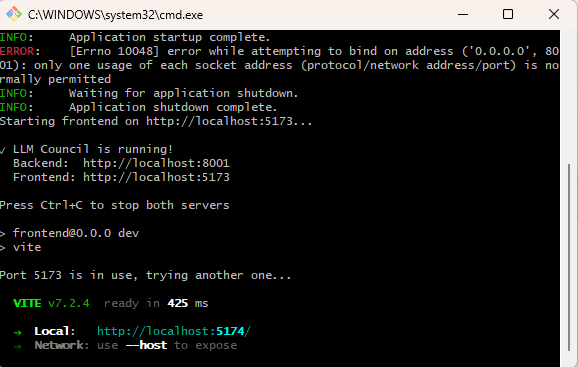
Mac and Linux users don’t need this — both platforms support shell scripts out of the box.
Here’s a quick demo of how this works with a prompt “How to become a great solution architect? I want to be able to build systems like Netflix and Uber.”
Great overview of the LLM Council pattern. This is exactly the space we've been building in at wisepanel.ai. The consensus architecture — ask all models, critique, consolidate — works brilliantly for verification and reliability.
We took a complementary approach: we use a patent-pending method to construct dialectical roles that surround the cognitive space of a question to unearth the most contrast possible, and hence maximize innovation, which we believe comes at the intersection of disparate knowledge domains.
Where consensus flattens disagreements into a single improved answer, dialectical roles preserve them by design — because in high-stakes decisions, the disagreements between perspectives are often more valuable than the agreements. Two complementary paradigms for a fascinating space.