

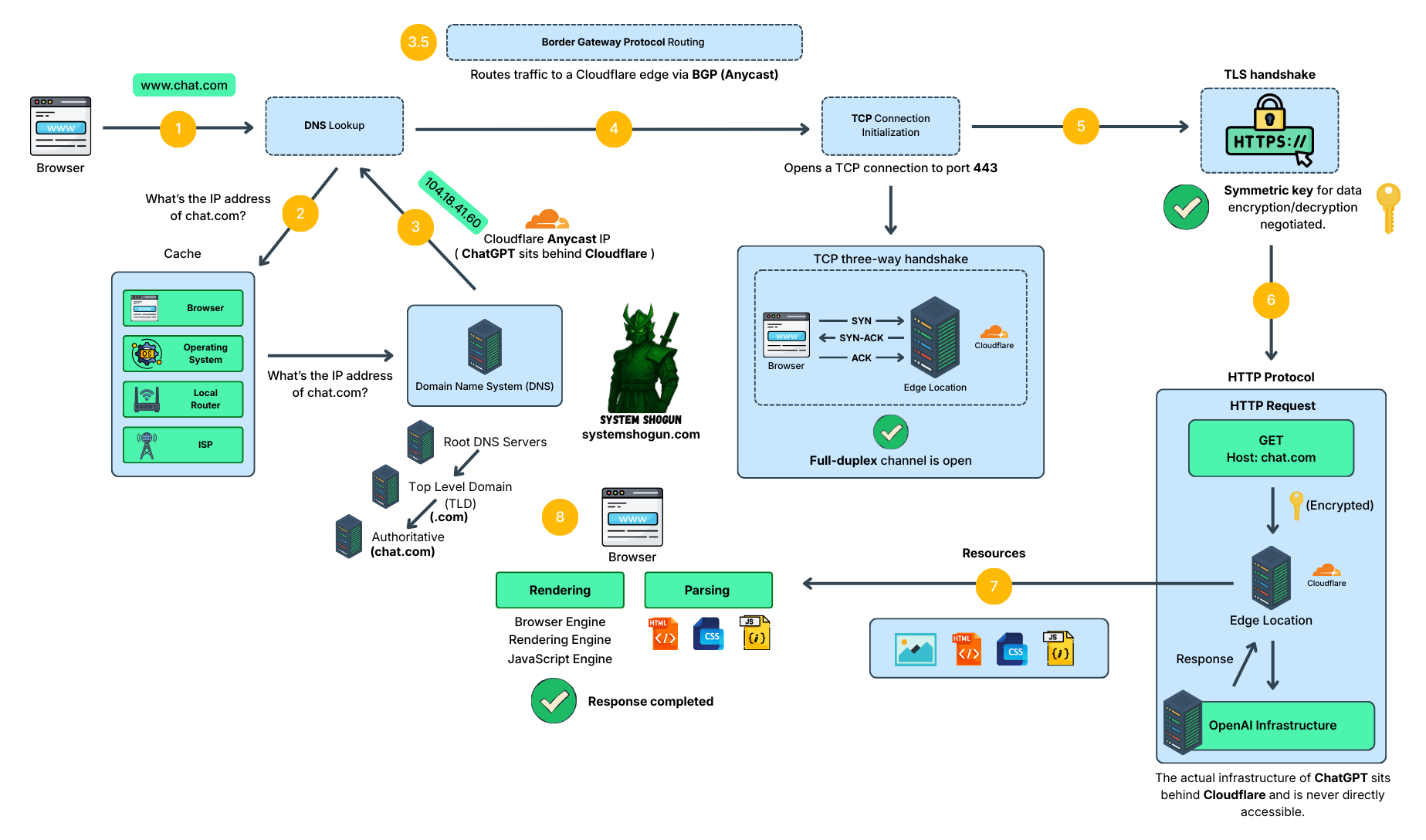
When you type chat.com in your browser and press Enter, a lot happens in milliseconds. In today’s post I am going to try and explain it with a system diagram that I’ve built for this purpose.
DNS Lookup
Domain names exist so humans can remember websites more easily. It’s much easier to remember chat.com than 104.18.41.60, right? But since every computer on the internet communicates using IP addresses, we need a way to translate a domain name into an IP address. That’s where DNS comes in.
Your browser first asks a simple question:
“What’s the IP address of chat.com?”
It checks caches (browser, OS, router, ISP).
If there’s no cached answer, it queries DNS by traversing the DNS hierarchy: first the root servers, then the top-level domain servers (.com), and finally the authoritative name server, which contains the IP address for chat.com.
This IP is Anycast, meaning the same IP is advertised from many locations globally.
What is Anycast?
Anycast is a network addressing and routing method in which incoming requests can be routed to multiple different locations, or “nodes.” With Anycast, the same IP address is advertised from servers in multiple geographic locations. This approach is commonly used by CDNs, such as Cloudflare, and provides benefits related to security, reliability, and performance.
For example, a hacker performing a DDoS attack would require significantly more resources to have a meaningful impact, because the traffic is distributed across many servers and locations rather than concentrated on a single endpoint (Unicast).
And of course, another benefit of CDNs in general is also enabled by Anycast. You are routed as close as possible to resources such as images, videos, and text. Basically, Anycast routes your traffic (via BGP, as explained later) to the nearest server that can handle your request. So, if you open chat.com, you will hit a server that is closest to you and therefore experience lower latency and overall good performance. For example, if you are in France, your request will not be routed to the US, but rather to a nearby location, such as Paris.
So, at the end of the DNS lookup process, we get an IP address such as 104.18.41.60, which belongs to Cloudflare, and not directly to OpenAI (ChatGPT).
Border Gateway Protocol (BGP)
BGP is the routing protocol of the internet. A hero almost no one talks about, yet it is the protocol that keeps the internet reliable by selecting paths between networks based on routing policies. To better understand how this works, let’s briefly talk about autonomous systems.
Autonomous systems
The internet is a network of hundreds of thousands of smaller networks called autonomous systems (ASes), each operated by a single organization (e.g., Cloudflare) and consisting of its own set of routers.
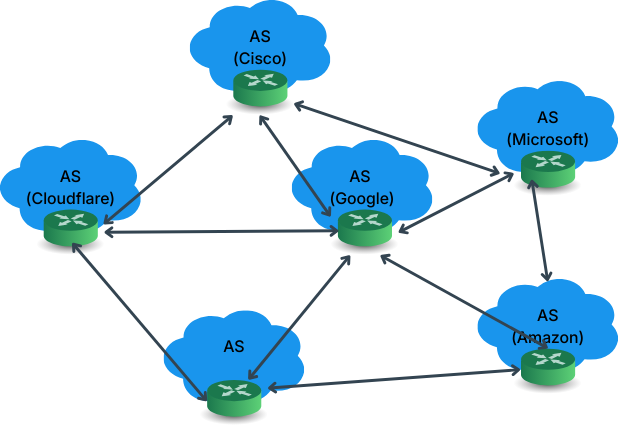
Basically, what BGP does is select a route from source to destination based on routing policies between autonomous systems, rather than simply choosing the path with the fewest hops. In practice, these policies can include factors such as business relationships, costs, and traffic agreements between ASes. But at a high level, the idea is simple: BGP determines how traffic moves between networks on the internet.
TCP
Once we have the source IP, destination IP, and port (443 in our case, because that’s what TLS uses), we are ready to start a TCP connection. This is handled underneath by the operating system (OS). The OS creates a TCP connection by adding the required headers—such as source IP, destination IP, and ports—and sending the packets over the network.
The process is a three-step procedure (commonly called the three-way handshake), where the client and the server acknowledge each other and establish an ongoing connection between them.
TLS
Since we don’t want our chat messages to be visible to third parties, we establish an encrypted channel over TCP. This is done using TLS, which relies on symmetric encryption algorithms such as AES to encrypt all data exchanged between the client and the server, including the chat messages. This works by negotiating a symmetric session key that is then used by both parties for encryption and decryption.
HTTP
Now that we have a secure (TLS) and ongoing (TCP) session, we are ready to start communicating with ChatGPT. To do that, we rely on the HTTP protocol. Since we want to load the ChatGPT page in our browser, we first send an HTTP GET request to chat.com.
All of this communication is encrypted using the negotiated symmetric key, and the request is sent not directly to ChatGPT’s infrastructure, but to Cloudflare, because Cloudflare sits in front of ChatGPT to protect its infrastructure, provide CDN capabilities, and handle traffic at the edge for the duration of the session. Remember, you never communicate directly with ChatGPT’s web servers.
Once the request is received and validated, it is forwarded to one of ChatGPT’s many web servers, which processes it. The web server then returns the website resources—such as HTML, CSS, JavaScript, and images—to Cloudflare’s servers, which in turn send the response back to your browser.
Browser
When the browser receives the response from Cloudflare, it parses the HTML, CSS, and JavaScript files and builds the DOM. The final step is rendering the page, where the browser renders the visual elements—that’s how you see ChatGPT in your browser.
Thank you
Now you know what happens when you open ChatGPT in your browser and all the steps that take place in milliseconds, almost like magic. If you found this post useful, please subscribe and share it with others.