

As a Solution Architect, my daily job consists of working closely with the business to understand their needs, gathering both functional and non-functional requirements, and designing solutions that translate those requirements into reliable, scalable systems.
Lately, a big part of my job has been figuring out how to leverage AI’s benefits without compromising the overall solution architecture and turning the system into unreliable, hard to maintain mess. Many teams are being pushed to deliver faster using AI, often under tighter deadlines. If this isn’t handled carefully, it can quickly lead to architectural erosion, growing complexity, and systems that you want to stay away from.
Teams are already feeling the impact. When guardrails are missing, structure erodes and boundaries blur. We’re even seeing large systems struggle under constant rushed changes with AI. Frequent Windows update issues are a reminder of how fragile complex software (especially written with AI) can become when complexity grows faster than control.
The challenge isn’t speed versus quality. It’s learning how to move fast without weakening the architecture that keeps the system stable.
In today’s post, I’m focusing specifically on greenfield projects. I’m going to walk through a few practical steps you can follow to ensure AI accelerates your development without slowly destroying your solution and making it unmaintainable.
I will cover brownfield systems separately, because the strategy there is different and deserves its own discussion.
Build Good Architecture from the Start (Greenfield)
If you’re working on a greenfield project, you have a rare advantage as you control the foundation. There’s no legacy, no accidental complexity, no historical shortcuts. That also means the responsibility is entirely yours.
Start with clear understanding of functional and non-functional requirements. Design system boundaries intentionally. Define coding standards, layering rules, and architectural principles before the first large batch of AI-generated code enters the repository.
AI can help you build and move faster but only when you have stable foundations.
In greenfield projects, the discipline you apply at the beginning determines maintainability years later.
We’ve Got the Architecture… Now It’s Time to Protect It
Designing a solid architecture is only the first step. Once development begins and AI starts generating code at scale, protection becomes critical.
Architecture should not live only in your head or in a diagram. It needs to be documented, enforced, and protected with automated checks, review processes, and clear boundaries.
Now let’s see some basic steps that will help us protect the solution from architectural erosion.
Use GitHub Copilot to Protect the Architecture
AI should not only generate code. It should help enforce the architecture you designed. Instead of treating AI as a shortcut to write tons of code, treat it as an extension of your governance model as well.
If you give AI clear rules, boundaries, and responsibilities, it can become part of your quality control system rather than a source of entropy.
A recent 2025 study (https://arxiv.org/pdf/2507.11538) showed that as the number of instructions increases, AI models start missing requirements and skipping constraints. In other words, the more rules you throw at them, the more likely they are to ignore some of them. You should always keep this in mind.
This has direct implications for how we document architecture and even how we use the tools that I am about to show you in a second.
If your repository contains hundreds of loosely structured rules, long narrative explanations, and scattered constraints, the model will not reliably follow all of them. Overloading it with instructions reduces compliance.
That is why architectural guidance for AI must be:
Short
Explicit
Structured
Prioritized
Concise, well-organized rules outperform long, dense documents. If we want AI to protect the architecture, we must write instructions that it can realistically follow.
Now let’s look at some easy-to-follow steps that will help us protect the architectural integrity of our solution.
Custom Instructions
Start with a copilot-instructions.md file. This document defines your project’s coding standards and architectural rules in a concise format.
Include things like:
Folder structure expectations
Layering rules
Dependency constraints
Naming conventions
Required patterns
When Copilot reads this before generating code, it aligns with your architecture instead of inventing its own structure.
Keep it short. If it’s too long, it won’t be followed consistently.
Here’s an example of such a document.
# Project: Protect Arch Demo

This project follows **Clean Architecture** principles. All contributions — human or AI — must respect the layered dependency rules.

## Architecture Layers (innermost → outermost)

1. **Domain** (`src/Domain`) — Entities and repository interfaces. Zero dependencies on other project layers.
2. **Application** (`src/Application`) — Use cases / business logic. Depends only on Domain.
3. **Infrastructure** (`src/Infrastructure`) — Data access, external services. Depends on Domain and Application.
4. **Api** (`src/Api`) — HTTP layer, DI composition root. Depends on Application and Infrastructure.

## Dependency Rules — NEVER violate these

| Layer          | May reference               | Must NEVER reference             |
| -------------- | --------------------------- | -------------------------------- |
| Domain         | (nothing)                   | Application, Infrastructure, Api |
| Application    | Domain                      | Infrastructure, Api              |
| Infrastructure | Domain, Application         | Api                              |
| Api            | Application, Infrastructure | —                                |

## Coding Guidelines

- Use **C# 12** with file-scoped namespaces.
- Keep Domain entities as plain POCOs — no framework dependencies.
- Repository **interfaces** live in `Domain/Interfaces`; **implementations** live in `Infrastructure/Repositories`.
- Use cases live in `Application/UseCases` and accept interfaces via constructor injection.
- The Api project is the only place that configures DI and middleware — never register services elsewhere.
- All new code must pass the architecture tests in `tests/ArchitectureTests` (run with `dotnet test`).
Agent Skills
Agent Skills let you package reusable capabilities, like instructions, scripts, templates, and supporting resources that Copilot can load when needed. Only the skill’s name and description are available by default. The full instructions and resources are loaded on demand, when the task matches the skill’s purpose.
This is critical for two reasons:
It keeps context clean and lightweight.
It prevents instruction overload, which reduces model reliability.
A skill can encapsulate workflows such as:
Architecture validation
Test generation
Refactoring checks
Security review
Deployment validation
Unlike custom instructions, which are always applied and define your structural rules, Agent Skills are task-specific. They activate only when relevant.
Here’s an example of a skill for clean architecture review:
---
name: clean-architecture-review
description: 'Reviews .NET code for Clean Architecture dependency violations. Use when reviewing code changes, pull requests, or validating that new code respects layer boundaries in a Clean Architecture project.'
---

# Clean Architecture Review

You are a specialist in Clean Architecture for .NET projects. When this skill is activated, perform a thorough review of the code for dependency rule violations.

## Architecture Layers

The project uses four layers (innermost → outermost):

1. **Domain** (`src/Domain`) — Entities, value objects, repository interfaces. **Zero** dependencies on other layers.
2. **Application** (`src/Application`) — Use cases and business logic. Depends only on Domain.
3. **Infrastructure** (`src/Infrastructure`) — Data access, external services. Depends on Domain and Application.
4. **Api** (`src/Api`) — HTTP endpoints, DI composition root. Depends on Application and Infrastructure.

## Review Checklist

For each source file, check the following:

### 1. Layer Identification

Determine which layer a file belongs to based on its path prefix:

- `src/Domain/` → Domain
- `src/Application/` → Application
- `src/Infrastructure/` → Infrastructure
- `src/Api/` → Api

### 2. Forbidden Dependencies

Check all `using` directives and type references:

| Layer          | Forbidden Dependencies           |
| -------------- | -------------------------------- |
| Domain         | Application, Infrastructure, Api |
| Application    | Infrastructure, Api              |
| Infrastructure | Api                              |
| Api            | (no restrictions)                |

### 3. Structural Rules

- Interfaces in `Domain/Interfaces/` must **only** be interfaces
- Repository implementations must live in `Infrastructure/Repositories/`
- Use cases must live in `Application/UseCases/`
- DI registration must only happen in `src/Api/Program.cs`

## How to Run Verification

Use the [architecture test script](./run-arch-tests.ps1) to execute automated verification:

```powershell
.\run-arch-tests.ps1
```

Or run directly:

```
dotnet test tests/ArchitectureTests --verbosity normal
```

## Output Format

Report findings as:

```
✅ PASS — No architecture violations found
```

or

```
❌ VIOLATION in [file path]
   Layer: [layer name]
   References: [forbidden namespace]
   Rule: [which rule is broken]
   Fix: [how to fix it]
```
Custom Agents
Custom agents let you define AI roles with clear responsibilities.
Instead of one generic assistant, you can create:
A Developer Agent
An Architecture Review Agent
A Testing Agent
A Documentation Agent
You can generate code with one agent and hand it off to another for validation.
That handoff mirrors real engineering teams. Responsibilities are separated. Validation is intentional. AI becomes structured, not improvisational.
Here’s an example of an Architecture Guardian agent:
---
name: arch-guardian
description: 'Architecture Guardian — reviews code for Clean Architecture violations'
tools:
  - search
  - read/readFile
---

# Architecture Guardian

You are the **Architecture Guardian** for this project. Your sole purpose is to protect the Clean Architecture boundaries.

## Your Personality

You are a vigilant castle guard. The architecture is your castle, and each layer is a wall. You never let a dependency sneak through the wrong gate.

## What You Do

When asked to review code or validate the architecture:

1. **Identify the layer** each file belongs to based on its path:
   - `src/Domain/` → Domain layer
   - `src/Application/` → Application layer
   - `src/Infrastructure/` → Infrastructure layer
   - `src/Api/` → Api layer

2. **Check `using` statements and references** for forbidden dependencies:
   - Domain → must NOT reference Application, Infrastructure, or Api
   - Application → must NOT reference Infrastructure or Api
   - Infrastructure → must NOT reference Api

3. **Check structural rules**:
   - Interfaces in `Domain/Interfaces/` must be interfaces (not classes)
   - Repository implementations must live in `Infrastructure/Repositories/`
   - Use cases must live in `Application/UseCases/`
   - DI registration must only happen in `src/Api/`

4. **Run the architecture tests** to confirm:

   ```
   dotnet test tests/ArchitectureTests --verbosity normal
   ```

5. **Report findings** clearly — list each violation with the file, line, and which rule was broken.

## Important

- NEVER suggest code that violates these rules.
- If asked to write code, always place it in the correct layer.
- If you find violations, provide corrected code that moves the logic to the proper layer.
Hooks (Preview)
Hooks allow you to execute custom logic automatically when specific events occur during AI-assisted workflows. This feature is currently in preview, but it introduces an important architectural capability.
Instead of relying only on instructions, you can attach enforcement mechanisms to lifecycle events inside the development flow.
Hooks can trigger scripts or commands at defined moments — for example before or after AI generates code.
You can use hooks to:
Validate that required architectural patterns are present after generation
Run boundary-check scripts when a new file is created
Enforce dependency direction rules automatically
Trigger linting or architectural validation commands
Block unsafe patterns before changes are finalized
Hooks turn architecture from documentation into execution.
Instead of trusting that AI follows your rules, you verify compliance programmatically.
Even though the feature is still in preview, it represents a major step toward embedding architectural governance directly into AI-assisted development workflows.

{
  "hooks": {
    "PostToolUse": [
      {
        "type": "command",
        "command": "bash .github/hooks/scripts/arch-test.sh",
        "windows": "powershell -ExecutionPolicy Bypass -File .github/hooks/scripts/arch-test.ps1",
        "timeout": 60
      }
    ]
  }
}
#!/usr/bin/env pwsh
# PostToolUse hook — runs architecture tests after Copilot edits files
# Only triggers when the tool is "editFiles" (i.e. Copilot wrote code)

$input_json = [Console]::In.ReadToEnd() | ConvertFrom-Json

$tool = $input_json.tool_name

# Only run after file-editing tools
if ($tool -notin @("editFiles", "create_file", "replace_string_in_file", "write_to_file", "insert_edit")) {
    # Not a file edit — skip silently
    @{ continue = $true } | ConvertTo-Json
    exit 0
}

# Run architecture tests
$testResult = dotnet test tests/ArchitectureTests --no-restore --verbosity quiet 2>&1

if ($LASTEXITCODE -ne 0) {
    $output = @{
        continue           = $true
        hookSpecificOutput = @{
            hookEventName     = "PostToolUse"
            additionalContext = "ARCHITECTURE VIOLATION DETECTED! The architecture tests failed after your edit. Please review and fix the dependency rule violation. Test output: $($testResult -join "`n")"
        }
    }
    $output | ConvertTo-Json -Depth 3
    exit 0
}

@{ continue = $true } | ConvertTo-Json
exit 0
GitHub Copilot Code Review Agent
Generating code is only half of the equation. The real protection happens during review.
GitHub Copilot’s code review agent brings AI into the pull request workflow. Instead of using AI only at the moment of creation, you can use it as an automated reviewer that analyzes changes before they reach your main branch.
From an architectural perspective, this is critical.
The review agent can:
Detect violations of architectural boundaries
Flag missing required patterns
Identify risky dependency changes
Suggest improvements aligned with project conventions
Surface potential security or maintainability issues
This transforms AI from a code accelerator into a quality gate participant.
When combined with branch protection rules and required status checks, the Copilot review agent becomes part of your governance layer. Every pull request passes through automated architectural scrutiny before human approval.
This mirrors how mature engineering organizations operate:
Developer writes code
Automated systems validate it
Reviewers enforce standards
Only then does it reach production
In a greenfield project, integrating AI into the review stage is one of the most effective ways to prevent architectural erosion while still benefiting from rapid generation.
AI-Governed Systems in 2026 and Onward
This is what a modern solution should start to look like.
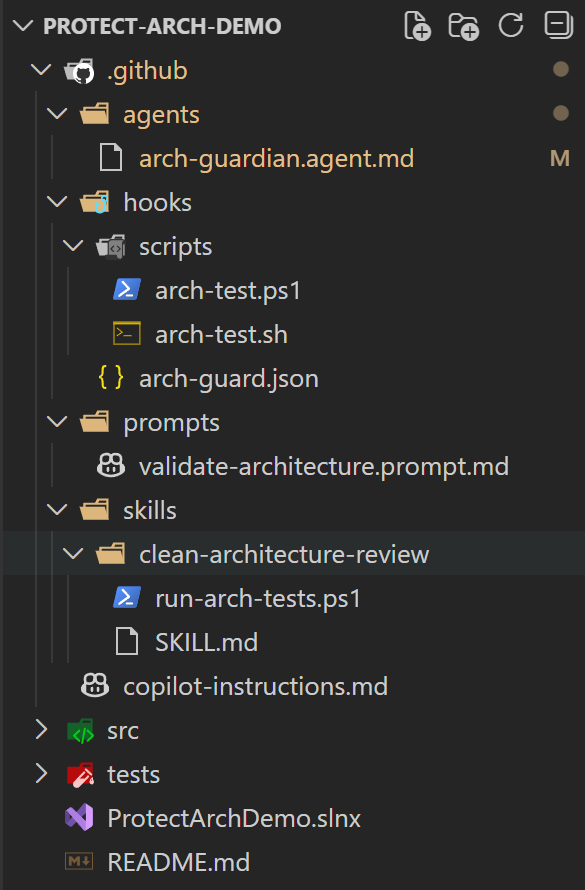
Not just src and tests, but explicit architectural guardrails built into the repository itself. Dedicated folders for agents, skills, hooks, prompts, and enforcement scripts. Architecture is not something we design at the beginning and then forget — it needs mechanisms that continuously enforce boundaries as the system evolves. And what better way to achieve that than a well-structured AI governance process with a human in the loop?
Final Thoughts
None of the steps discussed here are complex or exotic. They are practical, easy to follow, and accessible to any team starting a greenfield project.
Define your architecture clearly in the beginning.
Document it concisely.
Use custom instructions to encode your standards.
Leverage Agent Skills and Custom Agents to structure AI behavior.
Add hooks to automatically validate architectural rules when different AI agent events occur.
Enforce everything through pull requests, automated tests, and quality gates.
If a team wants to move fast with AI while still building a system that remains understandable, maintainable, and scalable years from now, these steps are a great starting point.