Do you need SignalR?
If your app only needs server-to-browser notifications, then you really don’t need the heavy SignalR and all the packages, rules and protocols it comes with. You need Server-Sent events, and in .NET 10 they are extremely easy to implement.
In today’s blog post I’m going to show you how you can get started.
Today’s demo shows how to build real-time UI updates in .NET 10 without SignalR, using plain Server-Sent Events. An Azure Function simulates a weather sensor writing data to the database, while a Minimal API streams the updates live to a Blazor WASM frontend.
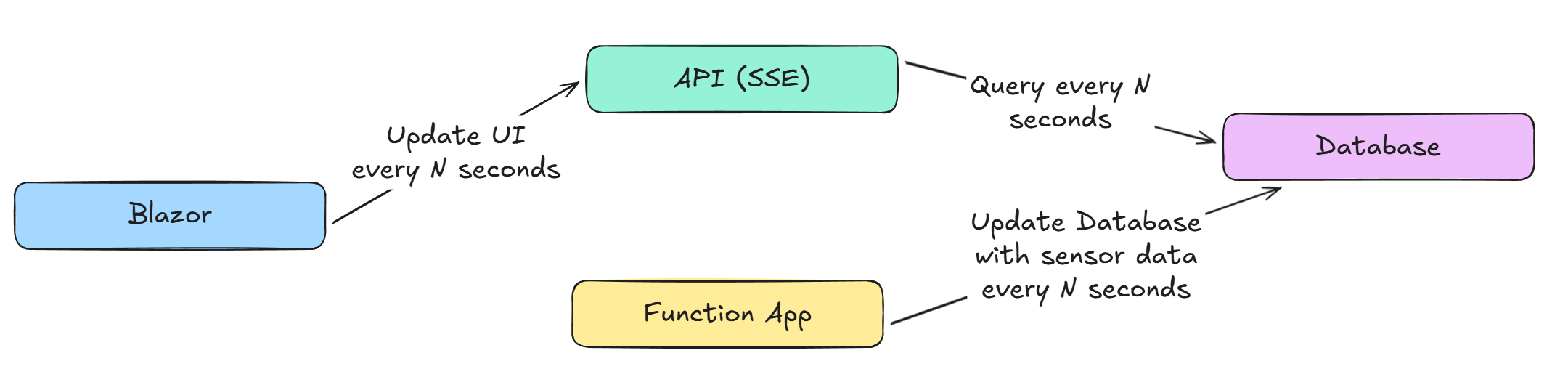
The solution consists of three projects:
Blazor WASM (for UI)
.NET 10 Web API (for SSE)
.NET 10 Function App (for updating SQL database with fictious weather data)
SQL Database (for storing sensor / weather data)
Required packages (for database manipulation):
Microsoft.EntityFrameworkCore
Microsoft.EntityFrameworkCore.SqlServer
I’m only going to share core code snippets here. See the full solution on GitHub here.
Database
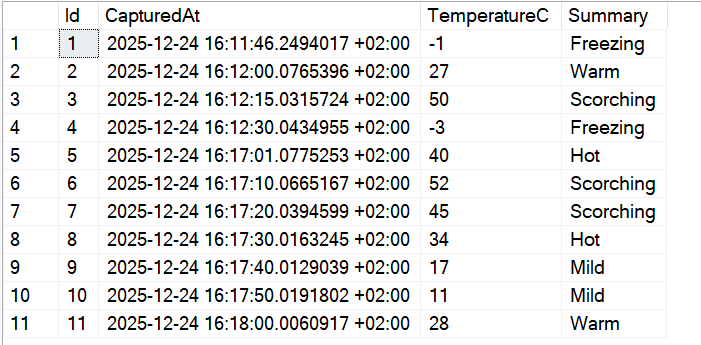
Our database has only one table called WeatherForecasts with basic structure (Id for PK, CapturedAt, TemperatureC and Summary)

Function App (SSE.WeatherSensor)
Our Function App runs every 10 seconds and inserts weather data into the database, simulating a live sensor.
Here’s what the table looks like after it’s populated with weather data generated by the Function App.
API (SSE.API)
This is the API endpoint that implements SSE. It polls the database every 5 seconds and streams the latest weather data to connected clients (our Blazor WASM).
app.MapGet("api/weatherforecast", (HttpContext context, SSEDbContext dbContext) =>
{

    async IAsyncEnumerable<WeatherForecast> GetWeatherForecastStream([EnumeratorCancellation] CancellationToken cancellationToken)
    {
        while (!cancellationToken.IsCancellationRequested)
        {
            var latestForecast = await dbContext.WeatherForecasts
                .OrderByDescending(wf => wf.CapturedAt)
                .FirstOrDefaultAsync(cancellationToken);

            if (latestForecast != null)
            {
                yield return latestForecast;
            }

            await Task.Delay(5000, cancellationToken);
        }
    }

    if (context.Request.Headers["Accept"] == "text/event-stream")
    {
        return Results.ServerSentEvents(GetWeatherForecastStream(context.RequestAborted));
    }
    else
    {
        return Results.BadRequest("Unsupported Accept header. Use 'text/event-stream'.");
    }
});
UI (SSE.Web)
This is our client app that subscribes to the SSE endpoint and renders the live weather updates in real time.
@page "/weather"
@using System.Net.ServerSentEvents
@using System.Text.Json
@using Microsoft.AspNetCore.Components.WebAssembly.Http
@inject HttpClient Http

<h3>Live Weather Sensor Feed</h3>

@if (forecast == null && string.IsNullOrEmpty(errorMessage))
{
    <p><em>Waiting for sensor data...</em></p>
}
else {
    <table class="table">
        <thead>
            <tr>
                <th>Time (Local)</th>
                <th>Temp (C)</th>
                <th>Summary</th>
            </tr>
        </thead>
        <tbody>

            <tr style="border: 2px solid black;">
                <td>@forecast.CapturedAt.ToLocalTime().ToString("HH:mm:ss")</td>
                <td>@forecast.TemperatureC°C</td>
                <td>@forecast.Summary</td>
            </tr>
        </tbody>
    </table>
}


@if (!string.IsNullOrEmpty(errorMessage))
{
    <div class="alert alert-danger">@errorMessage</div>
}

@code {
    private WeatherForecast forecast;
    private string? errorMessage;

    public class WeatherForecast
    {
        public int Id { get; set; }
        public DateTimeOffset CapturedAt { get; set; }
        public int TemperatureC { get; set; }
        public string? Summary { get; set; }
    }

    protected override async Task OnInitializedAsync()
    {
        try
        {
            using var request = new HttpRequestMessage(HttpMethod.Get, "https://localhost:7194/api/weatherforecast");
            request.Headers.Accept.Add(new System.Net.Http.Headers.MediaTypeWithQualityHeaderValue("text/event-stream"));

            using var response = await Http.SendAsync(request, HttpCompletionOption.ResponseHeadersRead);
            using var stream = await response.Content.ReadAsStreamAsync();

            var options = new JsonSerializerOptions { PropertyNameCaseInsensitive = true };
            var parser = SseParser.Create(stream, (type, data) =>
                JsonSerializer.Deserialize<WeatherForecast>(data, options));

            await foreach (var item in parser.EnumerateAsync())
            {
                if (item.Data is not null)
                {
                    forecast = item.Data;

                    await InvokeAsync(StateHasChanged);
                }
            }
        }
        catch (Exception ex)
        {
            errorMessage = $"Connection lost: {ex.Message}";
            await InvokeAsync(StateHasChanged);
        }
    }
}
Demo
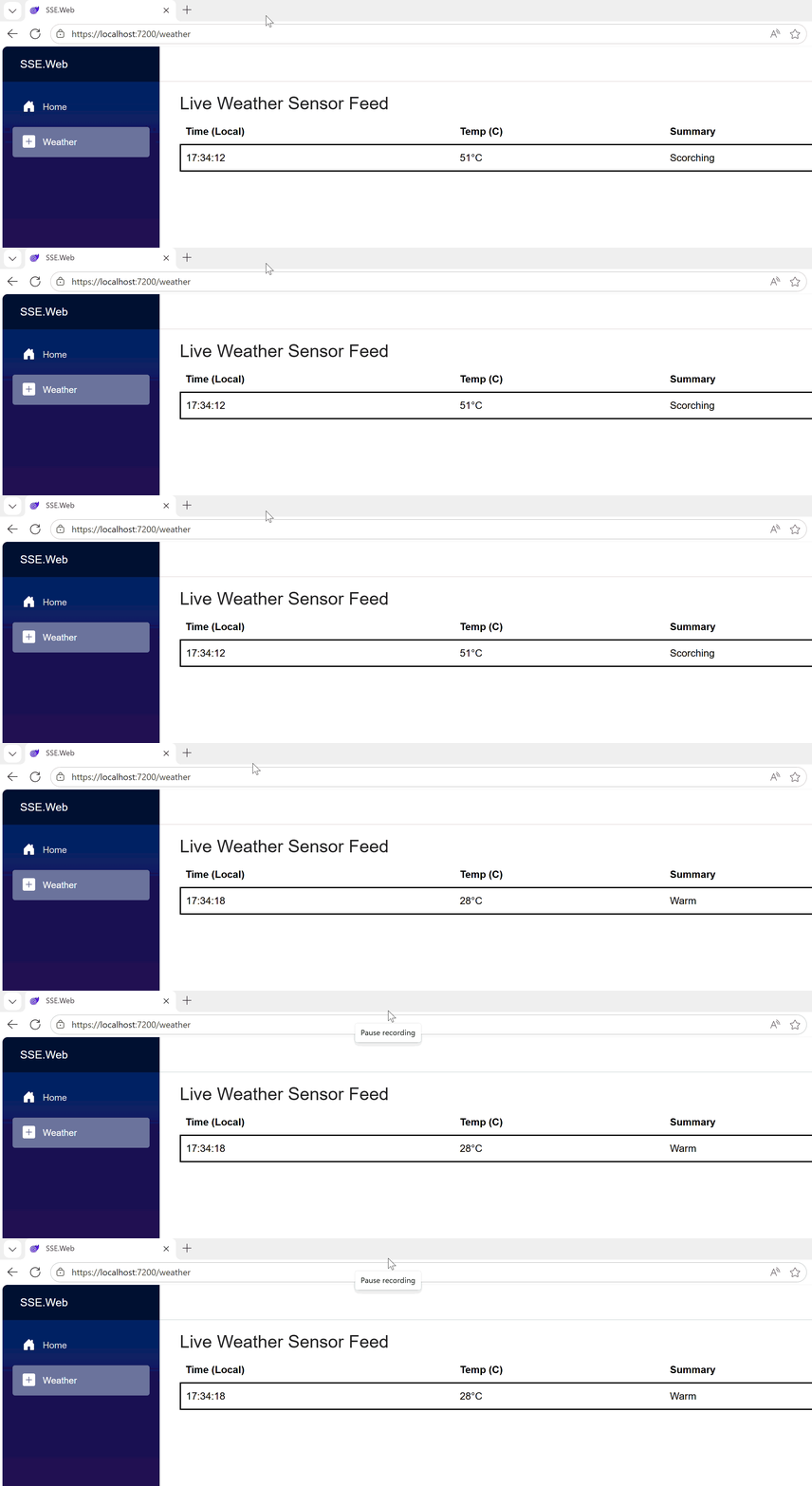
Here’s the whole solution in action.
TL;DR: If your use case is server-to-browser real-time updates only, you probably don’t need SignalR — SSE is simpler, cheaper, and easier to maintain. Make sure to consider it for your next project.